
Get started
Platform overview
How the pieces of the Multigate platform fit together, and the objects you work with through the API. Wallets, virtual accounts, collections, FX conversions and payouts make up Multigate's Cross-border Financial Infrastructure. Linked accounts, with their consolidated balances, statements and payments, bring Automated Treasury Management (the Multi-Bank Connector) to the same API. Trade finance adds letters of credit and bank guarantees, exchanged with banks over SWIFT.
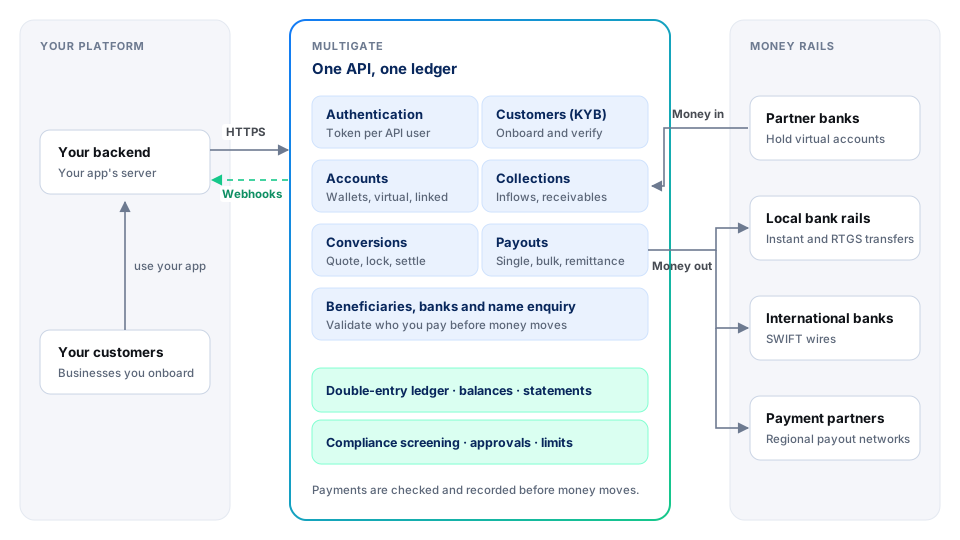
The core objects
Everything you do with the API creates or changes one of these objects.
erDiagram
    CLIENT ||--o{ CUSTOMER : "onboards"
    CLIENT ||--o{ ACCOUNT : "owns"
    CUSTOMER ||--o{ ACCOUNT : "owns"
    ACCOUNT ||--o{ VIRTUAL_ACCOUNT : "is reached through"
    CLIENT ||--o{ LINKED_ACCOUNT : "connects"
    ACCOUNT ||--o{ INFLOW : "receives"
    ACCOUNT ||--o{ TRANSFER : "funds"
    BENEFICIARY ||--o{ TRANSFER : "receives"
    CLIENT ||--o{ BENEFICIARY : "saves"
    ACCOUNT ||--o{ CONVERSION : "source or target of"
| Object | What it is | Created by |
|---|---|---|
| Client | Your business. Every request runs as one of your API users and is limited to your client's data. | Multigate, during onboarding |
| Customer | A business you serve. Onboard it once, then open accounts and send money for it with onBehalfOf. |
Create a customer |
| Account (wallet) | Holds a balance in one currency, for you or one customer. | Create an account |
| Virtual account | A dedicated bank account number in the account holder's name, issued by a partner bank, that credits a wallet. | Opened with the account |
| Linked account | A bank account your business already holds at another bank, connected to Multigate. | Link an account |
| Inflow | Money received into an account. | A payer, or the sandbox simulator |
| Beneficiary | Someone you pay. Saved beneficiaries can be reused by ID. | Create a beneficiary |
| Transfer | A payout from one of your accounts to a beneficiary. | Create a transfer |
| Conversion | An exchange between two of your accounts at a locked rate. | Lock a rate |
| Letter of credit | A bank's promise to pay a seller against agreed documents: an export LC you receive, or an import LC you apply for. | A bank's SWIFT message, or Submit an import LC |
| Guarantee | A bank's promise to pay a beneficiary if the applicant doesn't perform: an inward guarantee you receive, or an outward guarantee you apply for. | A bank's SWIFT message, or Submit an outward guarantee |
Account types
| Type | What it is | Typical use |
|---|---|---|
| Wallet | A balance in one currency on the Multigate ledger, for you or a customer. | Holding funds, paying out, converting. |
| Virtual account | A dedicated bank account number in the account holder's name, issued by a partner bank, that credits a wallet. Each wallet can have one or more. | Giving payers an account number to send money to (named or client-named accounts). |
| Linked account | A bank account your business already holds at another bank, connected to Multigate. The money stays at your bank. | Seeing aggregated balances and statements across your banks, and making centralised payments from them (Multi-Bank Connector). |
| Receivable account | A dedicated account opened for one invoice (receivable). | Matching incoming payments to invoices automatically. |
Every account has an accountType: wallet, viban (virtual account), linked or receivable. You may also see corporate, multigate or tsa on special-purpose accounts that Multigate sets up. See Accounts for how to open, link and use each type.
Which ID goes where
Newcomers most often mix up these identifiers. Each one comes from a specific response.
| Identifier | Looks like | Where you get it | Use it for |
|---|---|---|---|
| Client ID | Ab3k |
current from Get the current user |
clientId when you register your webhook URL. |
| Customer ID | Kx81m |
entityId from Create a customer |
onBehalfOf (or subClientId on beneficiaries) to act for that customer. |
Account ID (accountId) |
4b8e1f20-7c3d-… (a UUID) |
data[]. from List accounts |
source on a transfer, entityId on Get an account balance, and conversions. |
| Wallet account number | 1029384756 |
account from Get an account balance, or source in a transfer response |
source when you pay out or quote a fee. |
| Virtual account number | 9912345678 |
funding from List accounts |
Give it to payers. Use it with Simulate an inflow. You can also send it as a payout's source: Multigate debits the wallet it belongs to. |
unique |
acme_ |
You create it | Every money-moving request, then to look the request up. |
Transaction ID (transactionId) |
PMT-261010-093000482913 |
The transfer response | Support requests and receipts. |
How money moves
flowchart LR
    payer([Payer]) -->|bank transfer| va[Virtual account]
    va -->|inflow, screened| wallet[(Wallet balance)]
    wallet -->|conversion| wallet2[(Wallet in another currency)]
    wallet -->|transfer| rails{{Local rails or SWIFT}}
    wallet2 -->|transfer| rails
    rails --> beneficiary([Beneficiary])
- Money in. A payer sends money to a virtual account. Multigate screens the inflow, credits the wallet, and sends you an
account/inflowwebhook. - Hold and convert. Balances sit in wallets on the Multigate ledger (Multigate's record of every balance and every movement). You can convert between your wallets with a locked FX rate.
- Money out. You create a transfer. Multigate checks the balance, screens the payment, applies your approval rules, picks the rail, and pays the beneficiary. You get a
transfer/transfer_orcompleted transfer_webhook.failed
Asynchronous by design
Bank payments don't finish instantly. When you create a transfer, the API answers straight away with the transfer in a non-final status such as pending or processing. The final outcome arrives later:
sequenceDiagram
    autonumber
    participant You as Your backend
    participant MG as Multigate API
    participant Rail as Bank or partner
    You->>MG: POST create transfer (uniqueRequestId)
    MG-->>You: 200 OK, status pending or processing
    MG->>Rail: Send payment
    Rail-->>MG: Payment result (seconds to days)
    MG-)You: Webhook transfer_completed or transfer_failed
    You->>MG: GET transfer (optional check)
    MG-->>You: Final status
Build your integration around this:
- Treat webhooks as the source of truth for final outcomes, and verify their signatures. See Webhooks.
- Poll as a backup, not as the main mechanism. A few outcomes (for example a payment declined by your approver) don't send a webhook, so check the status of anything that hasn't reached a final status within the time you expect.
- A timeout is not a failure. If a request times out, look the object up by your
uniquebefore retrying. See Idempotency.Request Id
Request and response conventions
- Base URLs:
https://api-gateway-uat.(sandbox) andmmacs. io/platform https://api-gateway.(production), followed by the service path, for examplemmacs. io/platform /payment-service/api/v1/transfer/single-transfer. - Requests: JSON bodies up to 1 MB, with
Content-Type: application/jsonand your API key in themp-api-keyheader (see Authentication). File uploads usemultipart/form-data. Fields an endpoint doesn't define are dropped, not rejected. - Success: always HTTP
200, with the object at the top level of the body (nodatawrapper), except remittances, which nest it underdata. Most bodies also carry amessage, a human-readable text you can ignore. - Lists: paged; see Pagination.
- Errors: one of four JSON shapes; see Errors.
- Amounts are in major units; timestamps are ISO 8601 in UTC. See Amounts and currencies.
- Time limit: the gateway stops waiting after 60 seconds and answers
502or504. For a money-moving request, that outcome is unknown: look it up before retrying. - Rate limits: API calls have no request rate limit today. Keep a modest number of requests in flight and back off on
5xx.
Acting for your customers
Most endpoints work for your own business by default. To act for a customer, pass the customer's ID in onBehalfOf (in the body or query, depending on the endpoint). Multigate checks that the customer belongs to you. See Acting for your customers.
Approvals and compliance
Multigate applies controls before any money moves:
- Balance checks. Just before a transfer is debited (after approval and screening), Multigate checks that the source account's available balance covers the amount plus fees. If it doesn't, the transfer ends
failed(responseCode22) with atransfer_webhook, and nothing is debited. For a large NGN transfer that is split, or a linked-account source, the balance is checked when you create it instead (failed 400). Validate a transfer checks the balance up front. - Compliance screening. Payouts from your Multigate wallets, remittances and refunds are screened against Multigate's compliance rules before they are paid out; payouts from linked accounts skip this step. While a payout is screened it stays
pending; once it clears, it moves toprocessing. A payment that needs a closer look is held for Multigate's compliance team: it stayspendinguntil they decide. If compliance declines it, it endsfailedwithresponseCode43, nothing is debited, and no webhook is sent. Incoming payments are screened before they are credited; the inflow webhook is sent after the credit. - Customer checks. Customers of type
clientare screened when you submit them, and reviewed by Multigate compliance if anything needs attention. Countries Multigate can't serve are refused for every customer. - Approvals (maker-checker). If your API user isn't allowed to approve its own payments, a transfer it creates waits in
pending_until an approver in your business approves it in the dashboard. Ask us to give your API user both the initiate and approve payment permissions if payments should go straight to processing.approval
See Payouts for every status and what to do in each.